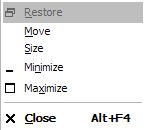
 Have you ever had a program show in the taskbar as running, but not show anywhere on the screen? (I’ve only had it happen in a dual-screen environment, but I suppose it could happen with a single screen.)
Anyway. Alt-Space is your friend.
Hit Alt-space, choose Move and then use the arrow keys to move the window back to the visible screen.
(Visited 34 times, 1 visits today)