Regular Expressions in AMPScript

Did you know you can use regular expressions in AMPscript?

You can.

Here are some RegExMatch() snippets that I’ve used:

Variables

@s = input string
@p = pattern
@m = match
@o = output

Sample Code

Output

Strip leading zeroes from a string
input: 0000012345
pattern: “^0*(\d+)$”
output: 12345

Check for all digits, no match
input: 12345x
pattern: “^\d*$”
output:

Check for all digits, match
input: 12345
pattern: “^\d*$”
output: 12345

Replace parenthetical text with space
input: whee (whatever it is) whoop
pattern: “\s(.+)\s”
match: (whatever it is)
replaced: whee whoop

For further reading

RegExMatch() function
Concat() function
OutputLine() function
RegEx pattern reference
RegEx options reference
Flexible Content Areas with XML Interfaces

Here is a good way to display a grid of external content in an email without repeating a significant amount of AMPscript. It utilizes an XML string and uses XPATH to retrieve content using the BuildRowSetFromXML() function.

Slide deck from my ExactTarget Connections Conference 2014 presentation

Helpful Links/Resources

Double Wide v2 – Responsive Email Pattern
XPATH reference
All AMPscript Functions
LookupOrderedRows() Function
BuildRowsetFromXML() Function
TreatAsContent() Function
ContentAreaByName() Function

Product Data Extension

SKUProductImageURLAvgCustomerRatingApprovedForEmail
1234http://placehold.it/150x150&text=12344true
2468http://placehold.it/150x150&text=24683true
1357http://placehold.it/150x150&text=13575true

Email Init Section

Email Body

Content Area Init Section

Content Area Body

Questions? Comments? Feel free to leave a comment below.

Adding Rows to Data Extensions

Data Extensions in the Salesforce Marketing Cloud platform are simply database tables in which you can store data you need for your campaigns.

You can add rows to data extensions using:

With the API, you have a few options — SOAP being the most complex, AMPscript the simplest:

You can use AMPscript in emails, landing pages or SMS keyword configurations. I’ll use AMPscript in this example.

Here’s how you add or update a single row in a data extension named My_Test_DataExtension using the UpsertDE() function:

Here’s a breakdown of the UpsertDE() arguments in this example:

  1. The name of the data extension to receive the data
  2. Number of columns you’re using to check to see if there’s a matching row already in the data extension. (This means there will be only 1 pair of name and value arguments following this parameter.  You could specify more.)
  3. The lookup column
  4. The lookup value
  5. Column 1 to update
  6. Column 1 update value
  7. Column 2 to update
  8. Column 2 update value

For further reading:
UpdateDE()
AMPscript Functions
UpsertData() (for SMS keywords)
UpdateData() (for SMS keywords)

T-SQL Split Queries

Testing content is a good thing in marketing. It’s especially appropriate for email.

Find what works best and go with it.

One way to go about that is to segment your sending audience into groups and send varying content to each group.

In the Salesforce Marketing Cloud platform, you can create those groups with queries. Here’s an example of a 20-20-80 split — two groups of 20% and the rest in the last group.


(Select the first 20% randomly)


(select 25% more of those not already selected in the first group)


(select the rest of the rows that are not in either of the first two groups)

You may be wondering if the second query is correct — 25% is not 20%. Here’s the math:

If you have a 100 subscribers and you subtract 20% — or 20 — you have 80 left.

If we want two equal groups of 20, then 20% of 80 is not 20, it’s 16. To get the correct count by percentage we’ll need to use 25% to get 20 from 80, since 80 * .25 = 20.

Also, ordering by NewID() will randomize the selection each run of the query.

For further reading:

Salesforce Marketing Cloud Bounces & Statuses

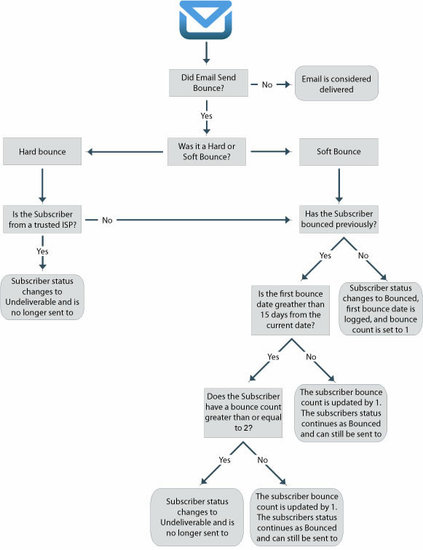
As you might expect, handling email bounces and subscriber statuses is a complicated balancing act undertaken by email service providers like Salesforce Marketing Cloud. Hard bounces, soft bounces, held status, unsubscribed, undeliverable — what do these really mean?

First of all, it means that subscriber statuses are not simply active or unsubscribed, which is sometimes difficult to explain to marketers — especially when they are scrutinizing subscriber reporting and statistics. There are a couple of pages that on the Salesforce Marketing Cloud help site that outline their bounce management process. The one that I’ve found most helpful is this one:

et-bounce-mail-management

Keep in mind that there are different kinds of unsubscribes:

  • list unsubscribe
  • master unsubscribe
  • global unsubscribe

Here is more info on that.