Adobe Photoshop has a nice posterize command built-in. Not so in Fireworks. I searched high and low for a nice way to do it. In desperation I posted an entry on the official Adobe Fireworks message board and Ilya Razmanov was posted exactly what I needed.
Here’s the steps with pictures to illustrate his technique:
1. Open a cool photo in Fireworks (Yes, Ray Allen is cool, if you didn’t already know).
![[ray allen]](https://sprignaturemoves.com/wp-content/uploads/2008/02/act_ray_allen.jpg)
2. Add this effect: Adjust Color -> Levels
![[posterize example 1]](https://sprignaturemoves.com/wp-content/uploads/2008/02/ff-posterize1.jpg)
3. Set the max value in Output Level to 4
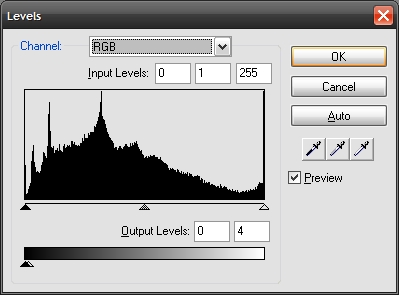
4. Add another effect: Add this effect: Adjust Color -> Levels. This time set the max Input Level to 4

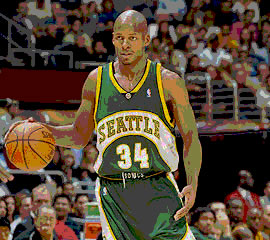
6. Voila! Here’s what you get. You can tweak the levels on both sides to get the amount of posterization you want.
(Visited 273 times, 1 visits today)