Sad, real sad. So it goes with the Bucks.
Kyle Korver taking a charge
![[korver taking the charge]](https://sprignaturemoves.com/wp-content/uploads/2008/03/korver_mccants.jpg)
As my luck would have it, right after I do a post about Kyle Kover, this nice picture of him shows up on fan sites everywhere.
Well, I like to think he’s bracing himself to take a charge and not having a bout of wimpy giggling.
I like Kyle Korver
![[kyle korver]](https://sprignaturemoves.com/wp-content/uploads/2008/02/kkorver.png) Check out the cool interview here.
Check out the cool interview here.
Not only is Kyle Korver money from the charity stripe (career 88.1%), he’s also an all around nice guy.
Reminds me of my main man (h/t Ahmad Rashad), Ray Allen.
What a breath of fresh air in the NBA.
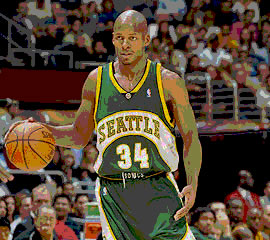
Spriglet #13 – Posterize a photo in Adobe Fireworks
Adobe Photoshop has a nice posterize command built-in. Not so in Fireworks. I searched high and low for a nice way to do it. In desperation I posted an entry on the official Adobe Fireworks message board and Ilya Razmanov was posted exactly what I needed.
Here’s the steps with pictures to illustrate his technique:
1. Open a cool photo in Fireworks (Yes, Ray Allen is cool, if you didn’t already know).
![[ray allen]](https://sprignaturemoves.com/wp-content/uploads/2008/02/act_ray_allen.jpg)
2. Add this effect: Adjust Color -> Levels
![[posterize example 1]](https://sprignaturemoves.com/wp-content/uploads/2008/02/ff-posterize1.jpg)
3. Set the max value in Output Level to 4
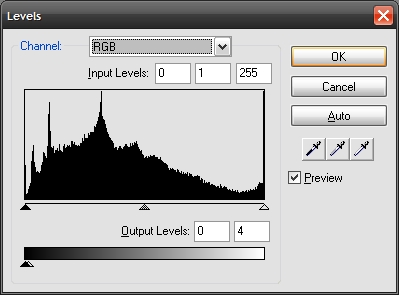
4. Add another effect: Add this effect: Adjust Color -> Levels. This time set the max Input Level to 4

6. Voila! Here’s what you get. You can tweak the levels on both sides to get the amount of posterization you want.